UQ-01 · Takeoff
Draw a zone. Get the quantities.
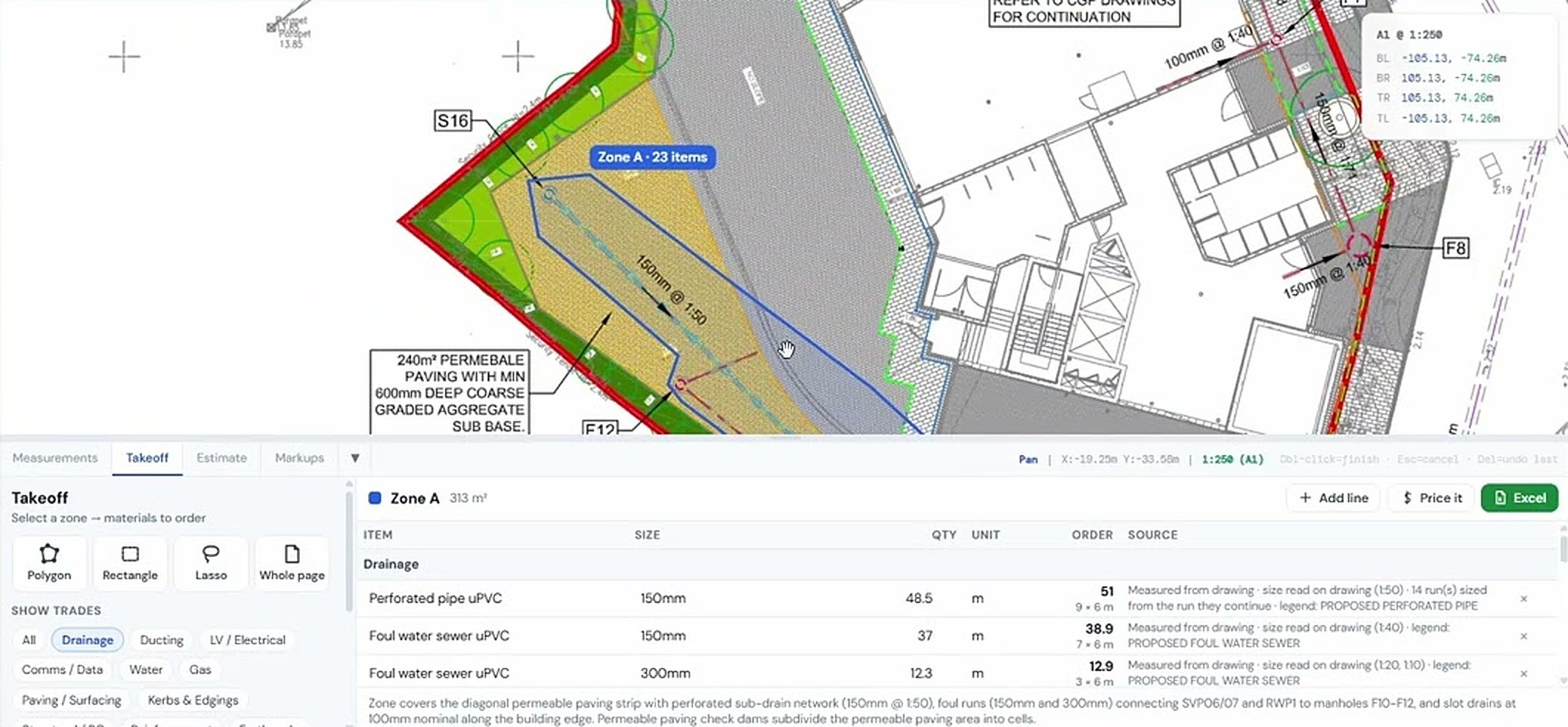
Select an area of a drainage or external works drawing and USEQUANTR reads the legend, measures every run by type and size and counts the chambers and gullies. Each item is marked on the drawing, so you can check it before it goes anywhere.
What it does
Takeoff, in detail
Reads the legend
Line types, colours and labels from the drawing legend are matched to the runs, so a 150 mm foul run and a 225 mm surface water run land on separate lines.
Measured and counted
Runs come out in metres, areas in m² and chambers, gullies and fittings as numbers, grouped by trade.
Materials, not just lines
Turn a pipe run into its build-up: excavation, bedding, surround and backfill per metre, worked out from the trench you set.
Checked on the drawing
Every measured item stays highlighted on the sheet. Click a line in the schedule and see exactly what was measured.
How it goes
Three steps
Open the drawing
Drop in a vector PDF exported from CAD and set the scale.
Draw the zone
Polygon, rectangle, lasso or the whole page. Pick the trades you want.
Check and export
Review the marked-up items, adjust anything, export the schedule to Excel.
Watch it work
See takeoff on a real drawing
Using the takeoff tool to count materials from a PDF drawing
Same project, other tools
It all works together


Used by Estimators & QS and Groundworks & drainage contractors.
Try takeoff on your own drawing
No account needed for your first takeoffs. 14-day free trial after that.
Open USEQUANTR